There are two possible ways to edit threads and posts:
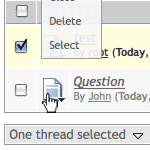
To edit a single thread or post you just need to click on the related icon. It should have a little arrow to indicate a popup menu. The menu has all options to edit this thread or post.
If you want to edit several posts or threads at once you need to select them with their related checkboxes (). If you have selected five threads for example there will be a button with the label "5 marked threads" at the bottom of the page. A click on that button opens a menu with options you can execute on the selected threads. You can bulk edit posts the same way.
Please note that not all options are available in both - the single and the bulk editing.

 Pmod.de »
 Help »
 Thread moderation
 Sunday, November 1st 2026, 1:58am
 Go to the top of the page